إدارة الأسطول
اجعل كل مركبة جاهزة للحجز التالي
نظّم تفاصيل المركبات والأسعار والتوفر والصور وسجلات الصيانة من لوحة تحكم واحدة.
ابدأ التجربة المجانية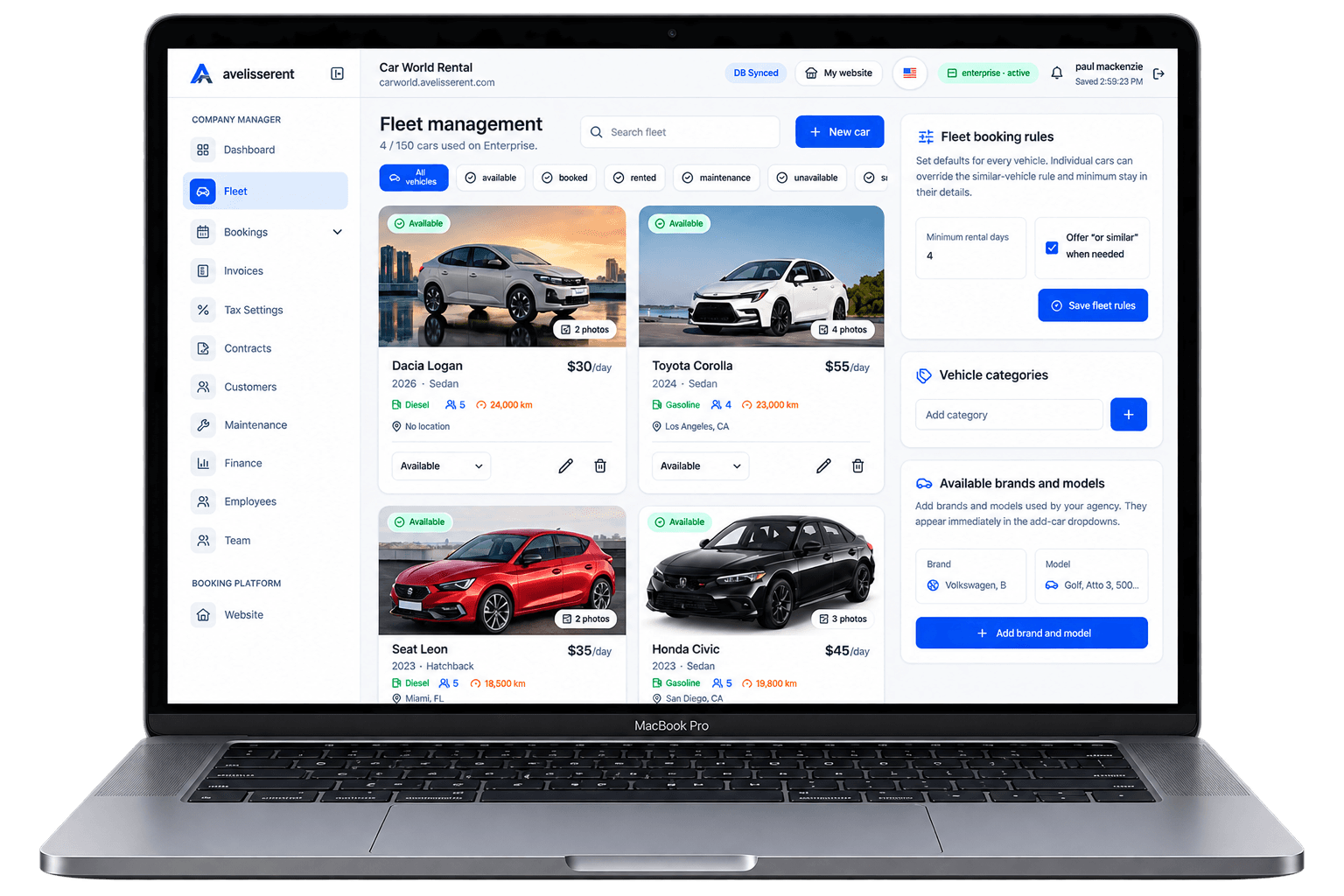
Car rental booking software should give customers a clear way to reserve while giving staff one reliable view of availability, pricing, deposits and booking status. The system you pick will quietly control almost everything that matters: bookings, vehicle availability, contracts, payments, and how easy it is for staff to do their jobs without mistakes.
This guide walks through what car rental booking software actually needs to do in a real rental business, where common tools fall short, and how a platform like AvelisseRent can support your operations without forcing you into someone else’s process.
What Car Rental Booking Software Should Do
Many tools promise “all-in-one” management, but when you’re running a small or mid-sized rental agency, your needs are specific and practical. A good system should improve four things above all:
- Booking accuracy – No double-booked vehicles, missing deposits, or lost reservations.
- Operational visibility – Clear views of vehicle status, upcoming pickups/returns, and revenue.
- Customer clarity – Contracts, pricing, mileage, and extras that are easy for customers and staff to understand.
- Consistency – Every rental handled the same way, regardless of which team member is working.
To get there, your car rental software needs to handle several workflows end-to-end, not just one piece in isolation.
Core Workflows Every Car Rental System Must Support
1. Online and Offline Booking Capture
You should be able to receive bookings from multiple sources and store them in one place:
- Direct online bookings via a branded website and reservation form.
- Phone and walk-in bookings entered by staff into the same system.
- Repeat customers quickly rebooked using saved customer records.
A complete booking workflow should let you:
- Set pickup and return dates and times.
- Choose the right vehicle from live availability.
- Apply your pricing rules (daily/weekly, seasonal, weekend rates, etc.).
- Add mileage rules and fuel policies.
- Offer extras (GPS, child seats, insurance, additional drivers).
- Record deposits and confirm the reservation.
With AvelisseRent, these steps are supported through a combination of branded booking websites, public fleet pages, and customizable reservation forms, all feeding into one booking management view so staff see the same information as your customers.
2. Fleet and Availability Management
Every booking depends on correct vehicle status. Your software needs to track:
- Which vehicles are available, booked, out on rent, or in maintenance.
- Upcoming pickups and returns by day and by location.
- Maintenance windows (scheduled service, tire changes, inspections).
Without clear fleet visibility you risk:
- Accepting bookings for cars that are already reserved.
- Promising vehicles that are in the workshop.
- Letting underperforming cars sit idle while others are overused.
AvelisseRent includes fleet management tools that centralize vehicle details, status, and photos. Your public fleet page can show only vehicles that are actually available for the selected dates, helping staff and customers avoid conflicts.
3. Contract, Invoice, and Payment Handling
Once a reservation is confirmed, your team needs to move cleanly into paperwork and payments:
- Generate a rental contract that reflects the booking details.
- Create and send a rental invoice with clear line items.
- Record or collect payment (deposit and balance).
- Update the booking status (reserved, active, completed, cancelled).
Manually building contracts and invoices in Word or Excel leads to errors: wrong dates, incorrect pricing, or missing extras. Car rental software should generate these documents directly from the booking data so numbers always match.
With AvelisseRent, you can:
- Create contracts and invoices from existing reservations.
- Store customer details in customer records for future use.
- Accept online payments via Stripe, configured in your agency’s payment settings.
This reduces manual re-entry and keeps your booking, contract, and payment timelines aligned.
4. Customer Records and Repeat Rentals
Every renter should create a history in your system:
- Personal and contact information.
- Past and current bookings.
- Invoices issued and payments received.
- Notes about preferences or conditions (e.g., always needs an automatic, usually returns late evening).
This information helps staff serve customers quickly, highlight when documents are missing, and assess risk. AvelisseRent’s customer records connect directly to bookings, contracts, and invoices so you can pull up a full relationship history in a few clicks.
5. Reporting and Analytics
Even a small fleet generates a lot of data. Your car rental software should offer analytics for questions like:
- Which vehicles are rented most frequently?
- Which pickup dates or seasons are busiest?
- How much revenue comes from extras vs. base rental charges?
Analytics in AvelisseRent use your real booking, contract, and invoice data to help you spot demand patterns and underperforming assets, without requiring spreadsheets or external tools.
Key Features to Prioritize When Evaluating Car Rental Software
Once you understand the workflows you need to support, you can check whether a software option really fits your agency. Below are the most important feature areas to evaluate.
1. Branded Online Booking Experience
Your customers should feel like they’re booking with your agency, not a generic portal. Look for:
- Branded website hosted for you, or the ability to integrate booking forms into your existing site.
- Support for custom domain and basic SEO settings so you can appear under your own brand in search results.
- Clear, mobile-friendly reservation forms that collect pickup/return dates, locations, and driver information.
- Clean presentation of vehicles, photos, pricing, and extras.
AvelisseRent provides a branded booking website and public fleet pages that you can customize with your colors, logo, and domain. That means you can accept online bookings on an address like yourbrand.com instead of a generic third-party URL, while still managing everything from a single dashboard.
2. Flexible Booking Management
Things change: flights are delayed, renters extend their trips, or you need to swap vehicles after a breakdown. Your system must allow staff to:
- Modify pickup or return times.
- Change vehicles while maintaining pricing rules.
- Add extras or adjust mileage allowances mid-rental.
- Record damages or additional charges and regenerate invoices.
In AvelisseRent, booking management tools are built for exactly these scenarios, so front-desk teams can adapt reservations without losing track of what was agreed.
3. Fleet Management That Matches Reality
Beyond basic availability, your fleet module should mirror how your agency actually works:
- Multiple vehicle types and categories (economy, SUV, van, premium).
- Details like registration numbers, mileage, fuel type, and pickup location.
- Status flags such as available, reserved, out, and maintenance.
AvelisseRent’s fleet management tools are designed for this practical day-to-day usage. Vehicles on your internal list can be selectively exposed on your public fleet page, so your team can maintain internal notes while customers only see what’s relevant.
4. Payment Options and Stripe Integration
Reliable payment handling is essential for both cash flow and customer trust. Look for:
- The ability to accept online payments during booking.
- Support for deposits and balances (collect some now, some later).
- Clear records of when and how each invoice was paid.
AvelisseRent connects to Stripe for collecting online card payments, which you configure from your agency’s payment settings.
5. Multi-Language and Communication Settings
If you serve international travelers or multiple local language groups, your storefront should adapt. Check whether your system supports:
- Multi-language storefronts so customers can browse and book in their own language.
- Configurable email settings so booking confirmations and updates use your branding and tone.
AvelisseRent includes multi-language agency storefront support and customizable email settings, so you can align your communication with how you actually talk to your renters.
How to Choose the Right Car Rental Software for Your Agency
When you compare options, focus less on long feature lists and more on how well each platform fits your specific operations.
Step 1: Map Your Current Process
Write down how a rental currently flows through your business, from first inquiry to final invoice:
- Customer asks for a quote (phone, email, website).
- Staff checks vehicle availability.
- Price is calculated including extras and mileage rules.
- Deposit is collected (or not).
- Contract is prepared and signed at pickup.
- Vehicle is returned, inspected, and final charges are applied.
- Final invoice is sent and paid.
This gives you a checklist for evaluating software. Any solution you consider – including AvelisseRent – should make this process simpler and more consistent, without forcing you to give up necessary steps.
Step 2: Identify Your Must-Haves vs. Nice-to-Haves
Common must-haves for many rental agencies include:
- Central reservation calendar with accurate availability.
- Support for both short-term and longer rentals.
- Online booking and payment collection.
- Professional contracts and invoices.
- Basic analytics on fleet usage and revenue.
Nice-to-haves might be deeper customization, multi-location support, or advanced reporting. Clarifying these helps you compare options objectively and avoid being distracted by features you won’t use.
Step 3: Test with Real Scenarios
When trialing a platform, simulate real situations you and your staff face every week:
- Create a weekend reservation with pickup Friday evening and return Monday morning.
- Add a flight delay and change the pickup time by several hours.
- Extend the rental by one day and add an extra driver mid-rental.
- Record a scratch on return and add a charge before finalizing the invoice.
As you test AvelisseRent or other tools, pay attention to how many screens you need to move through, how much re-typing is required, and whether staff could realistically follow the process on a busy day.
Using AvelisseRent as Your Car Rental Software
AvelisseRent is built specifically for rental agencies that need a practical, connected system rather than a patchwork of spreadsheets and forms. Here’s how it supports the workflows described above.
Branded Booking Website and Reservation Forms
With AvelisseRent you get a hosted, branded website where customers can:
- Select pickup and return dates and locations.
- Browse your public fleet with photos and key specs.
- Choose extras such as GPS, child seats, and insurance.
- Submit a complete reservation form with their information.
The website supports multi-language storefronts, so you can serve local customers and visitors in their preferred language, and includes domain and SEO settings to help your agency appear under its own name in search engines.
Central Booking and Fleet Management
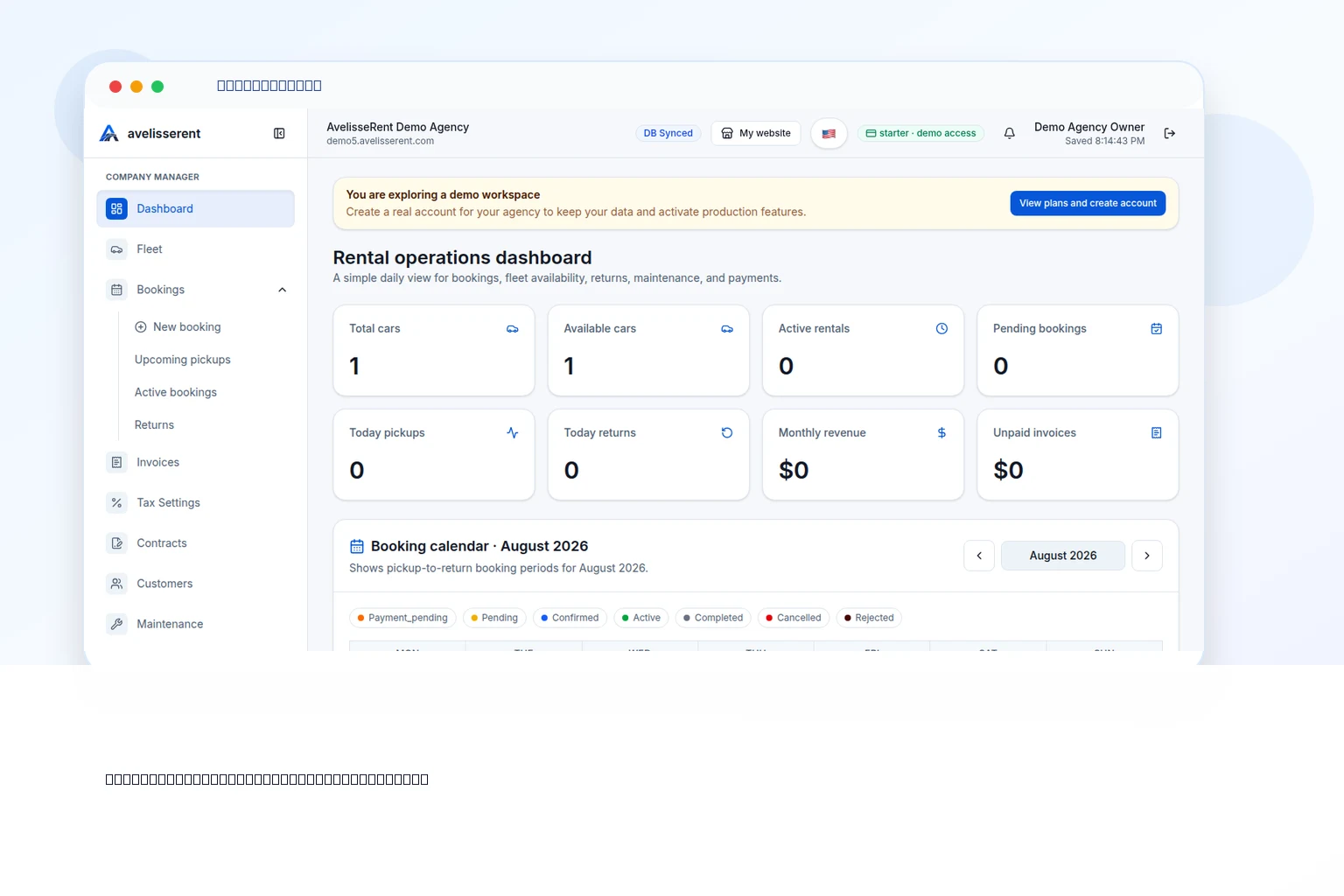
All reservations from the website feed into AvelisseRent’s booking management dashboard. Staff can:
- See all upcoming bookings by date and status.
- Assign or change vehicles from the fleet management module.
- Monitor vehicle status across available, booked, and maintenance states.
This reduces the risk of double-bookings and gives you a single source of truth for fleet availability.
Documents, Payments, and Analytics
From each booking, you can generate:
- Contracts reflecting the agreed rental terms.
- Invoices with line items for base rental, extras, mileage, and other charges.
You can accept online payments through Stripe, using settings configured within your agency account. For agencies offering long-term rentals
Finally, AvelisseRent’s analytics help you understand which vehicles perform best, when demand peaks, and how extras contribute to revenue, based on real booking and invoice data.
الخلاصة العملية
Effective car rental software is less about flashy features and more about reliably handling the everyday realities of your business: matching vehicles to dates, preventing errors, producing clear paperwork, and keeping payments and data organized.
Before you commit to any platform, make sure it supports your full workflow from initial inquiry to final invoice, and includes the practical tools you need: a branded booking website, reservation forms, fleet and booking management, customer records, contracts, invoices, payments, and analytics.
AvelisseRent brings these components into a single, coherent system built for rental agencies, so your team can focus less on admin and more on serving drivers.
الأسئلة الشائعة
Do I need car rental software if I have a small fleet?
Even small fleets benefit from proper software. Once you manage more than a few vehicles, it becomes easy to double-book, miscalculate pricing, or lose track of deposits and invoices. A system like AvelisseRent centralizes bookings, vehicle status, and documents, which is especially valuable when multiple staff share responsibilities.
Can car rental software work with my existing website?
Some systems require you to rebuild your website, while others provide booking widgets. AvelisseRent offers a branded booking website out of the box, plus reservation forms and public fleet pages that can complement an existing site. You can configure your domain and SEO settings so customers still experience a consistent brand.
How does AvelisseRent handle online payments?
AvelisseRent connects with Stripe so you can accept online card payments for deposits, balances, or full rental amounts. You manage payment settings inside your agency account, and payments are linked directly to invoices and bookings for clear reconciliation.
Can I support international customers with AvelisseRent?
Yes. AvelisseRent includes multi-language storefront support, allowing you to present your branded booking website and fleet information in multiple languages. This is particularly useful if you serve tourists or operate in multilingual regions.
What if my processes change in the future?
Your software should be flexible enough to grow with you. In AvelisseRent, you can adjust website customization, booking workflows, pricing setups, and communication templates over time. Because bookings, fleet data, and customer records are centralized, you can refine processes without losing historical information.
How long does it take to get started with AvelisseRent?
Implementation time depends on your fleet size and how complex your pricing is. Many agencies can set up vehicles, basic pricing, and a branded booking website relatively quickly, then refine details like email templates, multi-language content, and analytics as they go.
أدلة AvelisseRent ذات صلة
- Introducing AvelisseRent and your branded booking experience
- How to present your fleet online with AvelisseRent
- Evaluating AvelisseRent plans for your rental agency
- Talk to the AvelisseRent team about your requirements
مقالات ذات صلة
- How to Choose the Right Car Rental Software for Your Business (2026 Guide)
- Best Car Rental Management Software in 2026
- Designing a Frictionless Online Booking Workflow for Your Car Rental Agency
إدارة نشاط التأجير مع AvelisseRent
If you’re ready to move away from spreadsheets and disconnected tools, it’s worth seeing how AvelisseRent handles your full rental workflow – from online booking to contracts, invoices, payments, and analytics – in a single place.
Explore plans on the AvelisseRent pricing page .

Mohamed Elazzabi
Founder & CEO of Avelisse Labs LLC | SaaS & App Developer | Content Creator
I'm Mohamed Elazzabi, Founder and CEO of Avelisse Labs LLC Launching AvelisseRent SaaS platform built to help car rental businesses simplify and automate their daily operations. I create content about car rental business growth, digital transformation, automation, SaaS, and technology, sharing practical ideas to help rental agencies work smarter, reduce manual tasks, improve customer experience, and grow their business. Building smarter tools for modern car rental businesses.