Browse Website & Online Booking
Website branding and contact details control how the agency appears on public website headers, footers, contact pages, SEO previews, and customer booking pages.
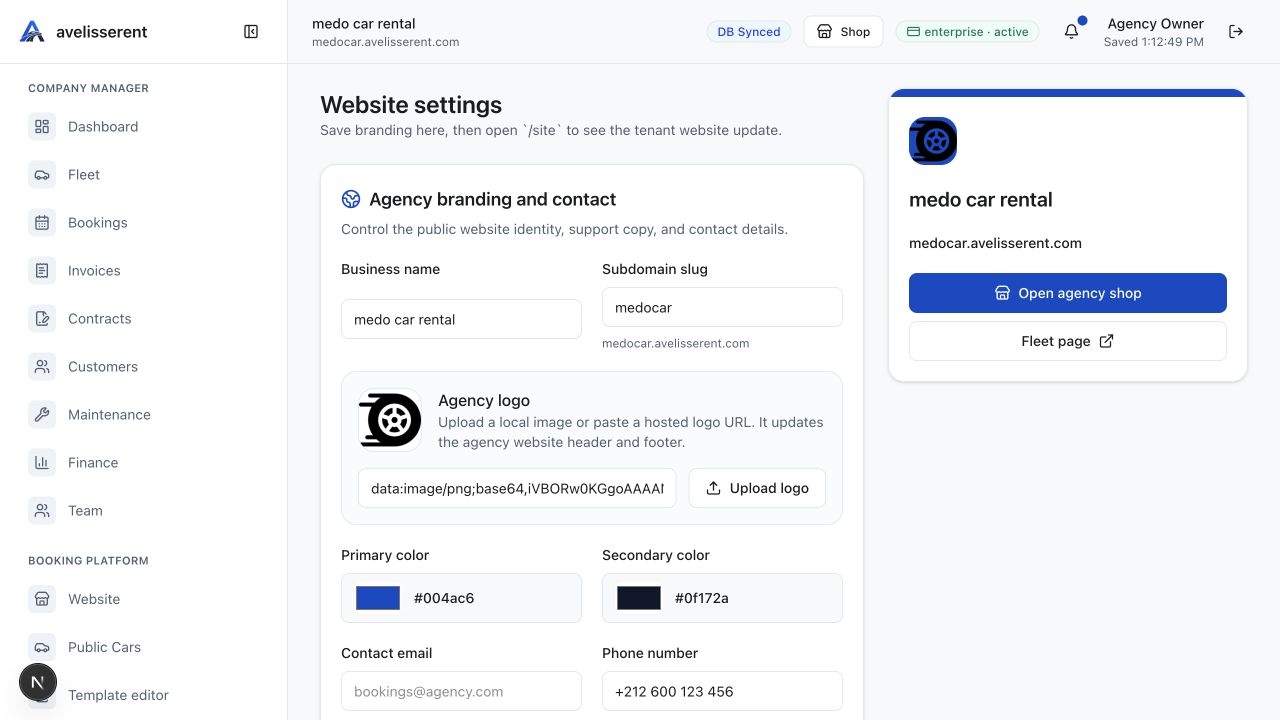
Agency branding and contact fields
Open Website Settings or Settings, then review Agency branding and contact. The confirmed fields are:
- Business name
- Subdomain slug
- Agency logo
- Primary color
- Secondary color
- Contact email
- Phone number
- WhatsApp number
- Business address
- Contact headline
- Website description
- Contact page message
Save branding changes
- Enter or update the public identity and contact fields.
- Use Upload logo or paste a hosted logo URL.
- Review the primary and secondary colors.
- Select Save branding.
- Open the website and confirm the header, footer, and contact page reflect the change.
Social media links
The Social media links section stores Instagram, Facebook, LinkedIn, and X links. These links appear in the agency website footer and contact page when configured.
Tax and legal identity note
The dashboard states that tax, currency, and legal identity settings moved to Tax Settings. Use Tax Settings for invoice and legal document identity, not the branding panel.
Was this article helpful?
Your feedback helps improve official AvelisseRent documentation.