Fleet management
Keep every vehicle ready for the next booking
Organize vehicle details, pricing, availability, photos, and maintenance records from one rental dashboard.
Start your free trial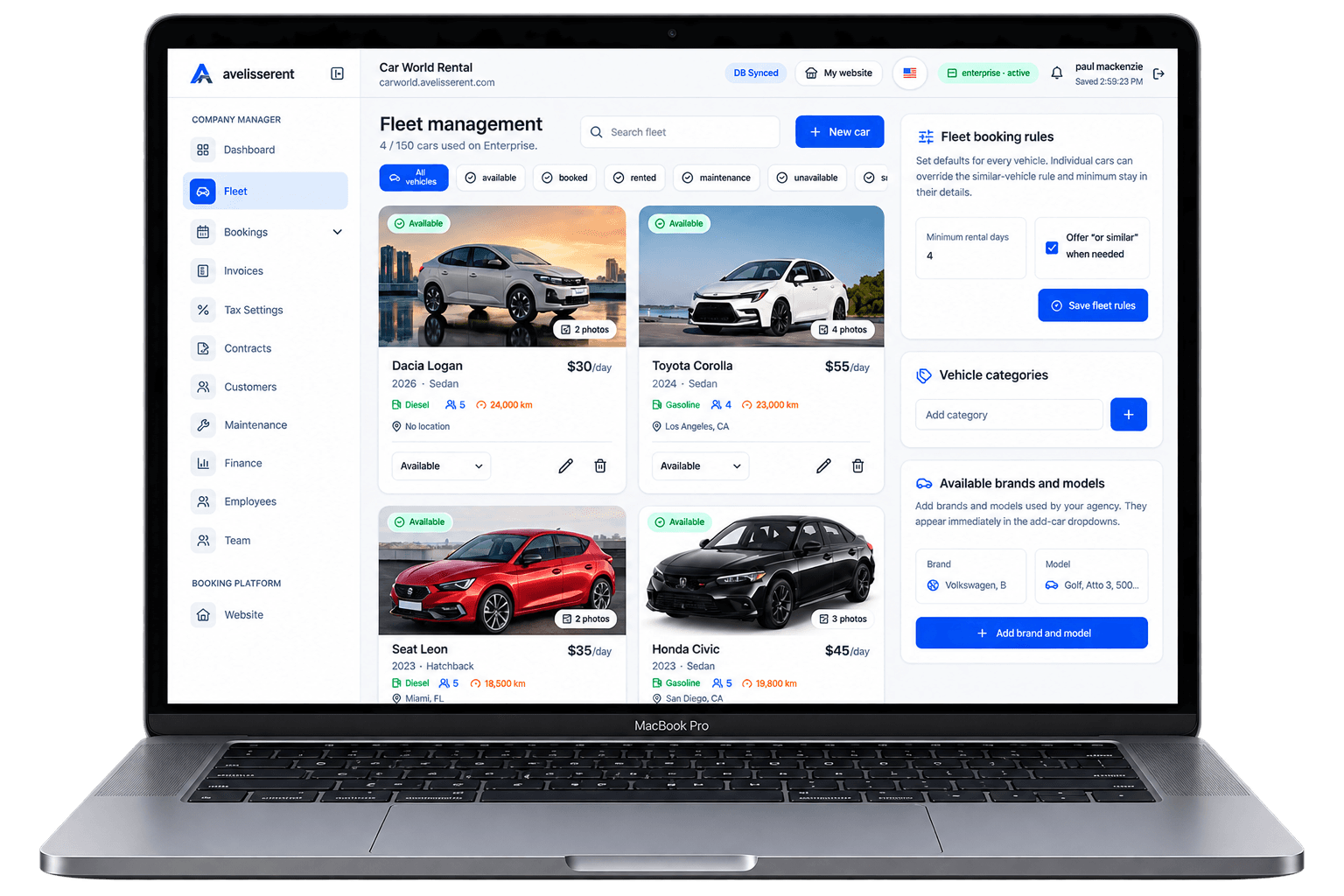
Running a rental fleet is a constant balancing act: you need the right vehicles, available at the right time, in the right condition – without letting cars sit idle or frustrating customers with "sorry, not available" messages.
This guide walks through a practical approach to car rental fleet management for agency owners and managers. The focus is simple: reduce avoidable downtime and availability mistakes while protecting customer experience and margins.
What “Good Fleet Management” Actually Means for a Rental Agency
Before getting into checklists and workflows, it helps to define what you’re aiming for. A well-managed rental fleet should:
- Match demand — you rarely have long waits lists or large groups of similar cars sitting unused.
- Stay roadworthy — inspections, servicing, and repairs are planned instead of reactive emergencies.
- Support a smooth customer journey — vehicles are ready, clean and as-booked at pickup.
- Stay financially healthy — each unit pays for itself over its lifetime and you can see which vehicles do or don’t pull their weight.
After reading this article, you should be able to design a clear fleet management system that your team can follow every day – and know which parts you can centralize in software such as AvelisseRent.
The Core Building Blocks of Car Rental Fleet Management
Fleet management for rental agencies usually breaks into six practical areas:
- Fleet planning and mix
- Vehicle onboarding and retirement
- Availability and utilization control
- Maintenance, inspections, and damage handling
- Pricing and extras strategy
- Reporting and decision-making
Each area should have an owner, a simple process, and a place to record information. That record can be a spreadsheet for very small fleets, but as soon as you manage more than a handful of vehicles, a dedicated platform becomes much easier.
AvelisseRent is built around these same building blocks: you define your fleet, connect it to public fleet pages, manage reservations and contracts, and track availability and invoices in one place.
1. Fleet Planning: Choosing the Right Mix for Your Market
Many fleet problems start long before a booking ever arrives – with the vehicles you bought or leased. If the mix is off, no amount of smart scheduling can fully fix it.
A simple planning framework
Use this basic loop once or twice a year to review your fleet plan:
- Map your demand
Look at the last 6–12 months of reservations. Group them by:- Vehicle category (economy, compact SUV, premium, vans, etc.)
- Rental duration (1–2 days, 3–6 days, 1+ week, long-term)
- Season (high vs low, weekends vs weekdays)
- Check your gaps
Identify where you most often had to decline a request or offer an alternative vehicle. - Check your excess
List categories where utilization is consistently low, or where you discounted often just to get cars moving. - Adjust your mix
Plan to add or retire vehicles based on steps 2–3, within your financial limits.
Even a basic view like this will quickly show whether you’re under-resourced in a category that sells out first, or holding too many slow-moving units.
Where AvelisseRent can help
Inside AvelisseRent, each vehicle is assigned to a category with its own pricing and availability. Over time you can review which categories are requested most often and which sit unused, using the platform’s reservation and invoice data to inform future buying decisions.
2. Vehicle Onboarding and Retirement Workflow
Every vehicle should go through a standard checklist the day it joins your fleet and the day it leaves. Skipping this step is an easy way to end up with missing documents, unclear damage history, or pricing mistakes.
Onboarding checklist for new vehicles
When you add a new vehicle to your fleet, make sure you:
- Assign a unique internal ID (not just the license plate).
- Record purchase or lease details (supplier, start date, contract end).
- Capture key specs (make, model, year, fuel type, transmission, color, seats).
- Define the category it will belong to for booking.
- Set base rates (daily, weekly, monthly) for each season where relevant.
- Log initial mileage and condition, including photos.
- Set the first planned maintenance date or mileage.
In AvelisseRent, this information lives in the fleet management area: each vehicle profile can store identification, basic details, pricing, and status. Once active, it can appear on your public fleet page and in your reservation flow.
Retirement checklist when removing a vehicle
When it’s time to sell or return a vehicle:
- Mark the vehicle as inactive so it no longer accepts new bookings.
- Finish or transfer any existing reservations.
- Export or save its rental history, invoices, and damage records.
- Record final mileage and condition.
- Update your fleet plan to reflect its removal.
Having this workflow documented prevents last‑minute cancellations because a sold vehicle was accidentally still bookable in your system.
3. Controlling Availability and Utilization
Availability and utilization are at the heart of rental fleet management. If you can’t trust your availability or see how well each vehicle is used, it becomes difficult to grow without constant manual checking.
Key concepts to track
- Availability: When a vehicle is free to be rented (not booked, in maintenance, or out of service).
- Utilization: How many of those available days the vehicle is actually rented.
- Turnaround time: The time you keep between return and next pickup to inspect, clean, and refuel.
Basic utilization calculation
You can estimate utilization for a given period with a simple formula:
Utilization (%) = (Total rental days in period ÷ Total available days in period) × 100
For example, if a car was available for 30 days in a month and rented for 18 of them, its utilization is (18 ÷ 30) × 100 = 60%.
Practical workflow to control availability
- Use a single source of truth
All reservations, maintenance blocks, and vehicle status changes should live in one system. Mixing spreadsheets, phone notes and email threads is how double bookings happen. - Define standard statuses
For each vehicle, use clear statuses such as: Available, Reserved, On Rent, In Maintenance, Out of Service. - Block maintenance in advance
As soon as you schedule maintenance, add a maintenance block to the vehicle calendar. - Review upcoming weeks
At least weekly, review the next 2–4 weeks of reservations to spot any awkward gaps, overbooked categories, or vehicles that are barely used.
AvelisseRent gives you a calendar-style booking overview where each reservation is connected to a specific vehicle and status. That helps you quickly see if a vehicle is double‑booked or sitting idle and lets you move reservations between vehicles within the same category.
4. Maintenance, Inspections, and Damage: Keeping Cars Roadworthy
Unplanned breakdowns and damage disputes don’t just cost money; they also damage trust with customers and strain your team. A clear maintenance and inspection process reduces these incidents and makes them easier to handle when they occur.
Preventive maintenance planning
Define a simple preventive schedule per vehicle type, based on manufacturer guidance and local requirements. For each car, record:
- Next service mileage and/or date
- Inspection checklist (fluids, tires, lights, documents, etc.)
- Any recurring issues to monitor
When a maintenance event is due, mark the vehicle as unavailable for that period in your fleet system so it can’t be booked accidentally.
Standard pickup and return inspections
Use the same inspection steps every time a vehicle goes out or comes back. For example:
- Walk around the car, checking bodywork and glass.
- Check interior for damage, stains, and missing items.
- Record mileage and fuel level.
- Take or update photos of any existing damage.
Document these findings in your rental agreement or inspection form. Consistent documentation makes it easier to explain charges to customers if you need to.
With AvelisseRent, vehicle and reservation records give you a central place to store notes and documents related to each rental, so you can keep inspection information and invoices connected to the right vehicle.
Handling damage and out‑of‑service periods
When damage is found:
- Mark the vehicle as In Maintenance or Out of Service in your system.
- Estimate the downtime and update the calendar so the car is not offered for new bookings.
- Record repair details and costs when available.
Legal and insurance requirements for damage and liability vary by jurisdiction. Work with your insurer and, if needed, legal advisor to define your damage process and ensure your rental contracts and communications follow local rules.
5. Pricing, Extras, and Their Impact on Fleet Performance
Pricing decisions directly affect how evenly your fleet is used. If one category is always discounted and another is always sold out, it’s a sign that your pricing and availability need to be reviewed together.
Pricing principles that support good fleet use
- Category-based pricing
Set base pricing at the category level first, then adjust for individual vehicles only when needed (for example, for a premium trim). - Season and event adjustments
Plan rate differences for high vs low season and for predictable spikes such as holidays or local events. - Length-of-stay logic
Offer different daily rates for short vs longer rentals, while keeping an eye on utilization. Long rentals can stabilize revenue but also lock up vehicles for extended periods.
Using extras to support the customer journey
Extras (GPS units, child seats, additional insurance options, etc.) can both increase revenue and shape how customers use your fleet. To manage them well:
- Track which extras are linked to which vehicles, especially physical items like child seats.
- Include extras in your turnaround process so staff know what to prepare for each rental.
- Review which extras are frequently out of stock and consider adjusting inventory.
AvelisseRent lets you define pricing at the category and vehicle level, and configure optional extras in your booking flow. This keeps your pricing consistent from online booking to invoice.
6. Reporting: Turning Fleet Data into Decisions
Data doesn’t need to be complex to be helpful. Focus on a small set of fleet metrics you can actually act on.
Practical fleet metrics to monitor
- Utilization by vehicle and category: Helps you identify underperforming units or an over‑popular category that needs more cars.
- Rental days vs maintenance days: Shows how much time vehicles spend earning vs parked in the workshop.
- Reservation lead times: Tells you how far in advance customers typically book, which is useful for planning fleet size and promotions.
- Cancellation rate: High cancellation rates might indicate unclear policies, pricing issues, or competition pressures.
You can track these metrics using exported data or reports from your reservation and invoicing system. With AvelisseRent, you can use the platform’s analytics views and downloadable data to review reservations, invoices, and fleet performance across time periods.
Putting It All Together: A Simple Weekly Fleet Management Routine
To make fleet management practical, turn it into a repeatable routine. Here is an example weekly cycle for a small to mid‑sized agency:
- Monday: Availability and overbooking check
- Review the next 2–3 weeks of reservations by category.
- Confirm that maintenance blocks are set for planned services.
- Reassign vehicles where necessary to avoid overbooking.
- Mid‑week: Maintenance and inspections review
- Check vehicles with upcoming maintenance milestones.
- Review recent inspection notes for any repeated issues.
- Friday: Performance snapshot
- Look at utilization by category for the past 1–2 weeks.
- Note vehicles that barely moved or were constantly requested.
- Record simple notes or action items (e.g., consider adjusting prices, moving vehicles between locations, or updating fleet plan).
If you use AvelisseRent as your central system for reservations, fleet, contracts, and invoices, this weekly review can be done from a single dashboard with consistent data, rather than chasing spreadsheets and emails.
Frequently Asked Questions
How many vehicles do I need before using dedicated fleet management software?
Some very small agencies work from spreadsheets when they have only a few cars. As soon as you notice frequent availability mistakes, double bookings, or difficulty tracking maintenance and invoices per vehicle, it’s worth moving to software built for rentals. Platforms like AvelisseRent are designed for smaller and growing fleets as well as larger ones, so you don’t need hundreds of cars to benefit.
What is the difference between fleet management and reservation software?
Reservation software focuses on taking and managing bookings. Fleet management adds vehicle‑level control: status, maintenance, availability, and performance. Many modern systems, including AvelisseRent, combine both views so you can see how each reservation affects specific vehicles and how your whole fleet is performing.
How often should I review my fleet mix?
At a minimum, review your fleet mix once a year. Many agencies find a light review every quarter helpful, especially in markets with strong seasonality. Look at utilization, customer requests you had to decline, and categories that require frequent discounting.
How do I avoid double bookings across online and offline channels?
The safest approach is to use a single system for all reservations and vehicle assignments, and to ensure staff always create bookings there first. Online bookings, phone reservations, walk‑ins, and partner bookings should all feed the same calendar. AvelisseRent supports branded online booking while also letting your team manually add reservations so everything stays synchronized.
What’s the best way to track vehicle maintenance for a small fleet?
Start with a basic maintenance log per vehicle: last service date, mileage, next due date, and any recurring issues. Use your rental platform, a shared document, or both. The key is consistency: every time a vehicle is serviced, update the log and block the right dates in your booking system so the car is not offered during maintenance.
How closely should I link pricing to utilization?
Pricing and utilization are related but should not be changed daily unless you have a clear strategy. Use utilization data to periodically review whether a category is under‑ or over‑priced compared to demand. Adjust prices deliberately, then monitor the effect over time instead of reacting to short‑term spikes.
Related AvelisseRent Guides
- AvelisseRent home – overview of how the platform supports fleet, bookings, and customer experience in one place.
- Fleet page – see how your vehicles can be presented to customers in a clear, bookable public catalog.
- Pricing page – review plans and features suitable for different fleet sizes and business models.
- Demo workspace – explore a live example of AvelisseRent with sample fleet and reservation data.
- Contact page – speak with the AvelisseRent team about your specific fleet management setup.
Related Articles
- How to Improve Car Rental Fleet Utilization Without Hurting Customer Experience
- Car Rental Reservation Software: What to Look For in 2026
- Designing a Frictionless Online Booking Workflow for Your Car Rental Agency
Manage Your Rental Business With AvelisseRent
Effective fleet management is much easier when your vehicles, reservations, customers, contracts, and invoices all live in one place. AvelisseRent is built specifically for car rental agencies that want clearer availability, fewer operational mistakes, and a better customer experience without adding complexity.
If you’re ready to see how a centralized system can support your fleet planning, day‑to‑day operations, and reporting, explore our plans on the pricing page or try AvelisseRent in a demo workspace. You can also reach out via the contact page to talk through your current fleet challenges and see whether AvelisseRent is a good fit.
Putting It All Together
Car Rental Fleet Management: Complete Guide for Agency Owners works best when the public booking experience and the back-office workflow support each other. Keep vehicle information accurate, make pricing and rental terms easy to understand, and give your team a consistent way to manage bookings, customers, contracts and invoices after each request arrives.

Mohamed Elazzabi
Founder & CEO of Avelisse Labs LLC | SaaS & App Developer | Content Creator
I'm Mohamed Elazzabi, Founder and CEO of Avelisse Labs LLC Launching AvelisseRent SaaS platform built to help car rental businesses simplify and automate their daily operations. I create content about car rental business growth, digital transformation, automation, SaaS, and technology, sharing practical ideas to help rental agencies work smarter, reduce manual tasks, improve customer experience, and grow their business. Building smarter tools for modern car rental businesses.