Fleet management
Keep every vehicle ready for the next booking
Organize vehicle details, pricing, availability, photos, and maintenance records from one rental dashboard.
Start your free trial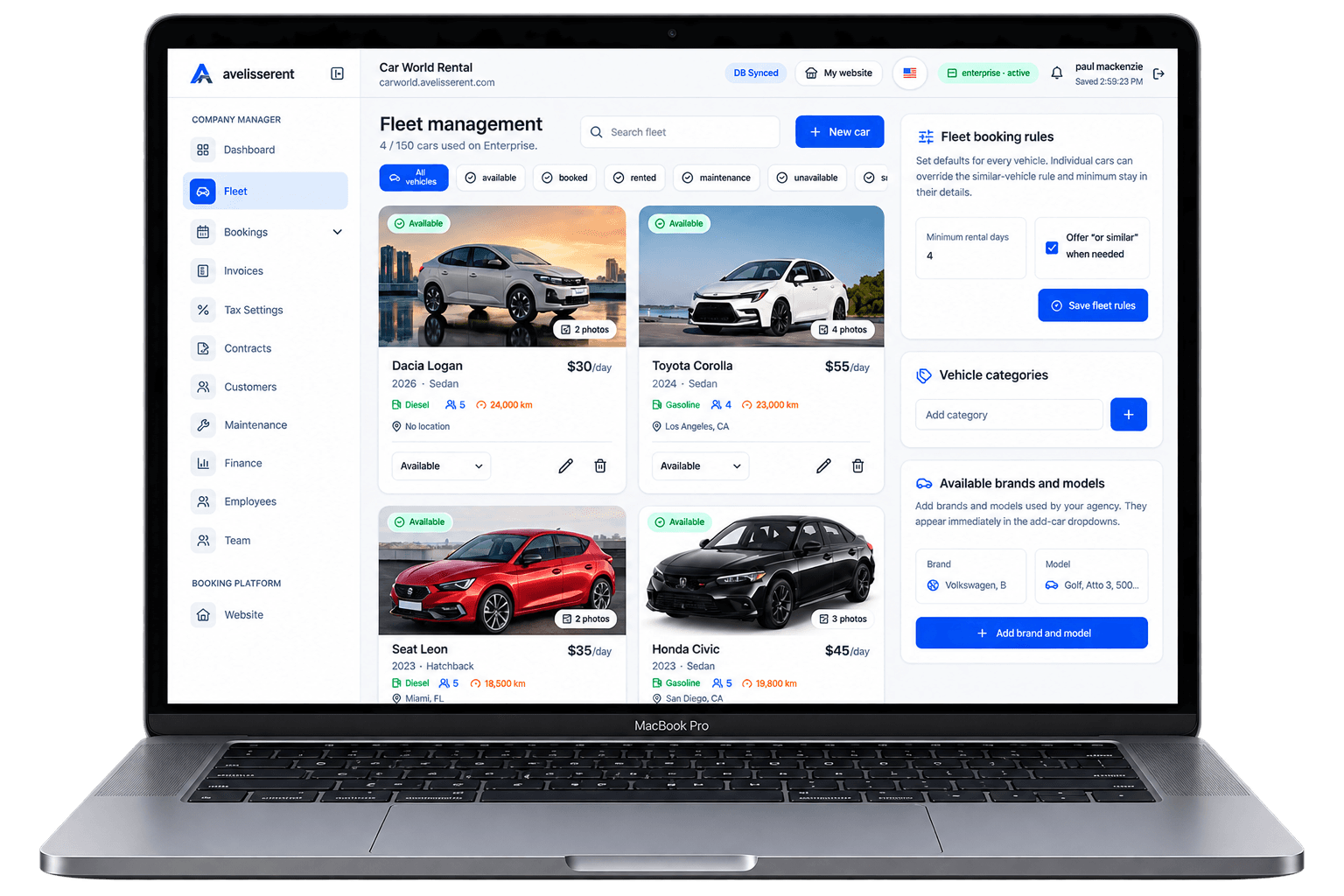
Your days are full: delayed returns, last‑minute bookings, staff questions, maintenance surprises. You know there’s demand for rentals in your market, but growth feels stuck between phone calls, spreadsheets, and vehicles sitting idle at the wrong time.
This guide focuses on one thing: how to grow a car rental business using practical, repeatable strategies you can plug into your existing operation.
We’ll group 15 strategies into a simple growth framework you can actually run every month, and show where a platform like AvelisseRent can support the workflow.
The Car Rental Growth Framework: 5 Levers to Focus On
Before jumping into individual tactics, it helps to see how growth really happens in a rental agency. Almost everything meaningful fits under five levers:
- Demand – how many quality booking requests you receive.
- Conversion – how many of those requests become confirmed, paid bookings.
- Utilization – how many days your fleet is on rent versus parked.
- Revenue per rental – what each booking is actually worth.
- Lifetime value – how often good customers come back or refer others.
After reading this article, you should know how to choose a small set of strategies under each lever, implement them as simple workflows, and track whether they’re working.
1. Clarify Your Numbers: The Monthly Growth Scorecard
Many agencies push for growth without a baseline. That makes it hard to know which change actually helped or hurt. Start by building a lightweight monthly scorecard.
Track at least:
- Total inquiries / booking attempts (website, phone, walk‑in).
- Confirmed bookings and cancellation count.
- Utilization rate (rental days ÷ total available vehicle days).
- Average booking value (rental fee + extras – discounts).
- Repeat customer share (bookings from past customers).
Simple utilization calculation example:
- Fleet: 20 vehicles.
- Days in month: 30 → 600 available vehicle days.
- Rented: 390 total vehicle days → utilization = 390 ÷ 600 = 65%.
Once you have this picture, every strategy below should connect back to at least one of these metrics.
Where AvelisseRent helps: by managing bookings, contracts, invoices, and vehicles in one system, it becomes much easier to pull basic utilization and revenue insights over a period instead of stitching numbers across tools.
2. Strengthen Your Online Booking Foundation
If customers can’t easily see your cars, prices, and availability, growth will always be limited by phone capacity and office hours.
Key steps:
- Make sure you have a clear online booking path (website or booking page) where customers can select dates, vehicles, extras, and enter their details.
- Only ask for the information needed to confirm a booking; extra forms can be handled at pickup.
- Show real vehicles with real photos, not only generic categories.
- Clearly display what’s included vs extra (mileage, insurance options, fuel policy).
For inspiration, review a live booking example like the Carworld demo website at https://carworld.avelisserent.com and its public fleet page to see how vehicles and booking flows can be presented.
Where AvelisseRent helps: agencies can publish a branded booking website and public fleet pages directly from their workspace, so customers can browse live availability and book without heavy web development.
3. Capture and Convert More Website Visitors
More traffic by itself doesn’t grow your business if those visitors don’t book. Focus on common drop‑off points first.
Checklist to improve conversion:
- Homepage clarity: within 3–4 seconds, visitors should know what you rent, where, and how to start a booking.
- Prominent booking widget: date/location picker should be visible above the fold, not hidden on a separate page.
- Transparent pricing: at least show base prices or “from” rates for common vehicles.
- Policy visibility: link to key rules (age limits, deposit, mileage) before checkout so customers aren’t surprised.
- Social proof: show real customer comments or rating snippets, even if they’re from offline feedback.
Walk through your booking journey as if you were a first‑time visitor. Note every place where you’d hesitate, feel confused, or need to call for clarification. Fix those first.
For more ideas, see Designing a Frictionless Online Booking Workflow for Your Car Rental Agency.
4. Use Pricing Tactics Without Destroying Trust
Pricing is one of the strongest levers for growth, but aggressive tactics can quickly damage reputation if customers feel tricked.
Practical, trust‑friendly ideas:
- Seasonal price bands: define low, shoulder, and high season rates for each class instead of changing prices randomly.
- Length‑of‑rental incentives: offer modest discounts for week‑long or month‑long rentals to improve utilization.
- Advance‑purchase rates: offer slightly better pricing for bookings made a certain number of days before pickup.
- Clear surcharge list: publish optional extras and fees so customers can estimate the total cost up front.
Review your competitors’ public pricing, but don’t blindly undercut everyone. Instead, understand where you can justify a higher rate (better vehicles, simpler pickup, clearer policies) and talk about it on your website and during booking.
Where AvelisseRent helps: you can configure pricing and optional extras by vehicle in the same system you use for booking, so staff always quote from a single, accurate source instead of personal spreadsheets.
5. Increase Utilization With Smarter Fleet Planning
Empty cars don’t grow revenue. But over‑booking or running without backup vehicles creates service failures and disputes.
Steps to improve utilization sensibly:
- Identify under‑ and over‑performers. Check which vehicles are most frequently on rent and which sit idle.
- Match fleet mix to demand. If your compact cars are always out but vans sit, your next purchase decision is easier.
- Plan maintenance around demand. Schedule routine maintenance during known quiet periods instead of ad‑hoc downtime.
- Use buffers around peak periods. Leave small gaps between high‑demand bookings to handle delays without cascading problems.
For a deeper operational view, explore Car Rental Fleet Management: Complete Guide for Agency Owners.
Where AvelisseRent helps: fleet management and booking calendars are connected, so you can see which vehicles are available, booked, or in maintenance before committing to a reservation.
6. Make the Pickup and Return Experience a Growth Asset
Many agencies invest in marketing and software but still lose repeat business because pickup and return feel chaotic.
Turn handovers into a strength:
- Use a standard pickup checklist (documents checked, fuel level, mileage, visible damage confirmation).
- Explain key policies verbally and show the customer where they are in the contract.
- At return, walk around the vehicle together, confirm fuel and mileage, and explain any extra charges calmly with evidence.
- Ask a simple closing question: “Is there anything we could have done to make this rental easier?” and note the responses.
A professional, predictable handover builds trust and reduces disputes, which makes customers more willing to book again or recommend you.
For more detail, see From Booking Details to a Professional Welcome.
7. Offer the Right Add‑Ons (Without Overwhelming Customers)
Extras can meaningfully increase revenue per booking, but only if they feel relevant, fairly priced, and clearly optional.
Common examples:
- Additional driver fees.
- Navigation or connectivity equipment.
- Children’s seats.
- Out‑of‑hours pickup or return services.
- Local passes or permits (where appropriate and compliant).
Group extras into a short, easy‑to‑understand list during booking and pickup. Avoid surprising customers with extras they never knowingly accepted.
Where AvelisseRent helps: extras and fees are configured by vehicle and appear across booking, contract, and invoice workflows, helping staff remain consistent.
8. Reduce Cancellations and No‑Shows With Better Communication
Cancellations, no‑shows, and late arrivals quietly erode utilization and revenue. Many of these can be reduced with clearer expectations.
Practical measures:
- Make sure confirmation documents highlight pickup location, time window, required documents, and deposit rules.
- Use simple, consistent subject lines for booking confirmations and updates.
- Send reminders before pickup using your usual communication channels (email or phone).
- Keep a short, clear written policy about cancellations and no‑shows and train staff to explain it the same way.
Even if you don’t automate reminders, a disciplined process for confirming key details and requirements can prevent last‑minute surprises that lead to disputes or lost rentals.
Where AvelisseRent helps: bookings have a central place with customer details, contracts, and invoices, so staff can quickly reference and send consistent information instead of recreating it each time.
9. Improve Fleet Utilization Without Damaging Experience
Chasing 100% utilization at all costs can produce over‑booking, rushed cleaning, and frustrated customers. A more balanced approach is to remove the most common causes of idle time while preserving service quality.
Focus on these sources of waste:
- Unnecessary gaps between bookings because teams can’t see upcoming returns.
- Extended maintenance because issues aren’t logged until the day of the next booking.
- Holding vehicles “just in case” when they could be used for shorter rentals.
Define a basic turnaround standard (for example, minimum time you need between return and next pickup for cleaning and checks) and apply it consistently in your planning. Then look for patterns where vehicles regularly sit unused outside that buffer.
For a detailed exploration, see How to Improve Car Rental Fleet Utilization Without Hurting Customer Experience.
10. Build Simple Partnerships That Feed You Bookings
Some of the most reliable growth channels come from offline relationships that match your customer profile.
Potential partners include:
- Local hotels, guest houses, and serviced apartments.
- Travel agencies or tour operators.
- Body shops and garages needing replacement vehicles for their customers.
- Corporate offices with frequent mobility needs.
Start with one or two partners. Agree on:
- How their staff will present your service.
- How reservations will be made (direct link to your booking page, phone line, or email).
- Any agreed commission or discount structure, documented in writing.
Once the partnership proves useful, create a simple “partner info” page or PDF with your key vehicles, base prices, and referral process.
11. Systematize Reviews and Referrals
Happy customers are a powerful but often underused growth driver.
Basic workflow:
- During return, if a customer is clearly satisfied, ask for permission to send a follow‑up link to leave a review on your preferred platform.
- Collect reviews steadily rather than in one‑off campaigns.
- Where appropriate, ask specific customers if they would be comfortable recommending you to colleagues or friends.
Keep the process simple and respectful. The goal is a slow, consistent build of genuine public feedback, not a sudden spike.
Where AvelisseRent helps: because customer records and past bookings are stored in one place, you can identify repeat or high‑value customers and prioritize them for feedback and referral outreach.
12. Standardize Policies to Reduce Disputes
Disputes consume time, hurt staff morale, and can damage your online reputation. Many stem from unclear or inconsistently applied policies.
Areas to standardize:
- Deposit rules and when funds may be withheld.
- Mileage limits and how extra distance is charged.
- Fuel policies and evidence requirements.
- Damage reporting and assessment steps.
Requirements vary by jurisdiction, insurer, and payment provider, so it’s important to check your contracts and professional advice. Once defined, keep policies in one master document and ensure your booking confirmations, contracts, and staff explanations all match it.
Where AvelisseRent helps: contracts and invoices for each booking live alongside reservation details and vehicle records, so it’s easier to show customers the basis for charges.
13. Use Automation to Remove Bottlenecks – Not Replace Oversight
Growth stalls when owners still approve every small operational decision. Automation can help, but only when tied to clear processes.
Good candidates for system support include:
- Capturing booking details and customer data once and reusing them across contract and invoice documents.
- Keeping vehicle status updated as cars move from available to booked to returned and into maintenance.
- Generating invoices from confirmed bookings instead of manual copy‑paste.
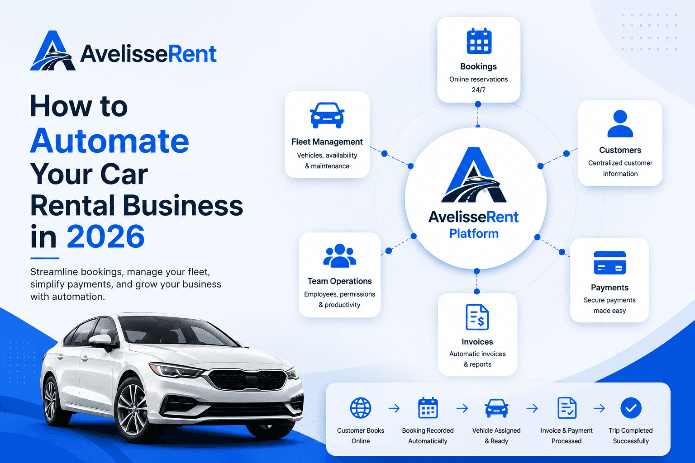
For a focused guide, see How to Automate Your Car Rental Business in 2026.
Where AvelisseRent helps: it connects booking, fleet, customer records, contracts, and invoices in one platform, reducing duplicate data entry and manual errors that slow growth.
14. Train Your Team Like a Growth Engine
Even the best process fails if only the owner understands it. Growth requires that staff know exactly how to handle common situations.
Focus training on:
- How to use your booking and fleet system for everyday tasks.
- How to explain core policies the same way every time.
- How to handle basic customer complaints and when to escalate.
- How to recognize and note potential repeat or corporate customers.
Create short scripts and checklists for pickup, return, and phone inquiries. Update them when you adjust policies, not months later.
15. Review and Adjust Strategies Every Quarter
Growth isn’t a single project; it’s a cycle. To keep from getting overwhelmed, set a repeating quarterly review.
Quarterly review structure:
- Look at your scorecard: demand, conversion, utilization, revenue per rental, repeat customers.
- Identify 2–3 areas that moved in the right direction and 1–2 that didn’t.
- Decide which strategies to double down on and which to pause.
- Choose no more than three new changes to test in the next quarter.
This rhythm keeps you improving without dismantling the whole operation every few weeks.
Putting It All Together
Growing a car rental business is less about one big marketing idea and more about consistently improving the five core levers: demand, conversion, utilization, revenue per rental, and lifetime value.
If you:
- Measure your baseline with a simple scorecard,
- Build a clear online booking experience and transparent pricing,
- Plan your fleet and maintenance against demand,
- Standardize policies and handover processes, and
- Hold a quarterly review where you adjust based on data,
you put your agency on a predictable growth path instead of hoping for busy months.
Software alone will not create demand, but a system that connects your website, fleet, bookings, customers, contracts, and invoices makes these strategies much easier to implement and maintain.
Frequently Asked Questions
How do I know if my car rental business is ready to grow?
You’re usually ready to push for growth when you have consistent demand in at least one season, basic processes for bookings and handovers, and enough financial room to handle added vehicles, staff, or marketing. If current operations feel chaotic, stabilize core workflows and policies first; otherwise, growth can amplify existing problems.
What should I focus on first: more cars or more bookings?
Start by maximizing utilization of your current fleet without harming customer experience. If key vehicle types are frequently unavailable while others sit idle, adjust your mix before adding total units. Only invest in additional vehicles when you can see consistent demand you’re currently turning away or regularly over‑stretching existing cars.
Which growth strategies work best for small, local rental agencies?
For smaller agencies, local partnerships, a clear online booking page, transparent pricing, and excellent handovers often provide the highest return. You may not match large brands in advertising, but you can compete strongly on clarity, personal service, and reliability.
How important is online booking for growth?
Online booking is increasingly important because many customers expect to check availability and approximate pricing before contacting you. It doesn’t have to replace phone or walk‑ins, but a simple, trusted online path makes it easier to capture demand at any hour and reduces administrative work per booking.
How can I avoid customer disputes as I grow?
Publish clear policies, highlight key conditions during booking and pickup, use contracts and checklists at handover and return, and keep evidence (fuel level, mileage, damage notes) associated with each booking. Ensure all staff explain rules consistently and avoid last‑minute surprises with charges that weren’t mentioned earlier.
Do I need new software before I can grow?
You can grow to a point with manual tools, but as vehicle count, bookings, and staff increase, spreadsheets and paper contracts tend to create errors, double‑bookings, and slow decisions. Modern software is most helpful when you feel you are spending more time reconciling information than serving customers.
Related AvelisseRent Guides
- Car Rental Fleet Management: Complete Guide for Agency Owners
- Designing a Frictionless Online Booking Workflow for Your Car Rental Agency
- How to Automate Your Car Rental Business in 2026
- How to Improve Car Rental Fleet Utilization Without Hurting Customer Experience
- Car Rental Reservation Software: What to Look For in 2026
Related Articles
- Building a Consistently Great Car Rental Experience From First Click to Final Invoice
- How to Fix the Most Common Customer Experience Gaps in Your Car Rental Agency
- Car Rental Booking Software: Complete Guide for Rental Companies
Manage Your Rental Business With AvelisseRent
If you want your growth efforts to rest on a solid operational base, AvelisseRent can help. From a branded booking website and public fleet pages to connected bookings, contracts, invoices, and vehicle records, it’s designed around how modern rental agencies actually work.
Explore how it fits your operation by visiting our pricing page or trying the workflows in a live demo workspace.

Mohamed Elazzabi
Founder & CEO of Avelisse Labs LLC | SaaS & App Developer | Content Creator
I'm Mohamed Elazzabi, Founder and CEO of Avelisse Labs LLC Launching AvelisseRent SaaS platform built to help car rental businesses simplify and automate their daily operations. I create content about car rental business growth, digital transformation, automation, SaaS, and technology, sharing practical ideas to help rental agencies work smarter, reduce manual tasks, improve customer experience, and grow their business. Building smarter tools for modern car rental businesses.