Browse Finance & Analytics
Use Finance, the Rental operations dashboard, and Data export to review agency performance from the records already stored in AvelisseRent. These views summarize bookings, invoices, payments, expenses, tax rules, vehicles, maintenance, and staff data.
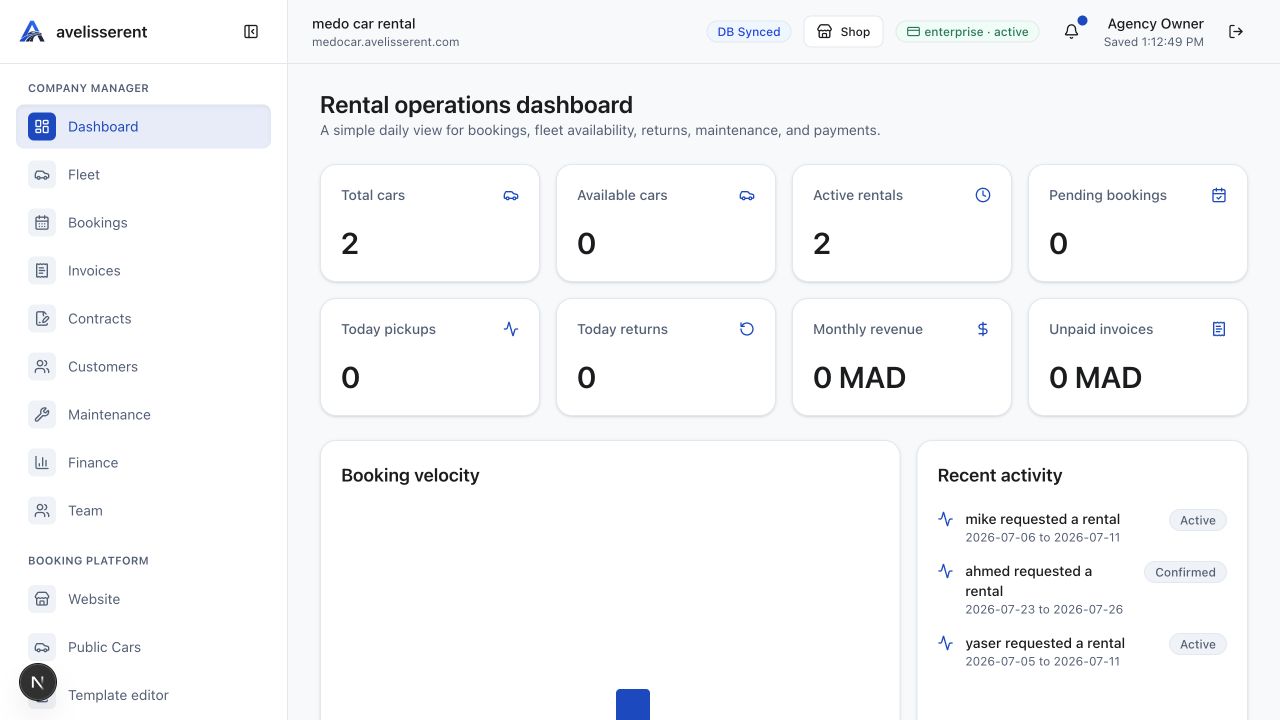
Finance and analytics areas
- Rental operations dashboard: daily view for bookings, fleet availability, returns, maintenance, and payments.
- Performance analytics: booking development and revenue for the last 12 weeks.
- Finance: live gross revenue, manual expenses, automatic taxes, net revenue, bookings, active rentals, fleet availability, maintenance cost, and unpaid invoices.
- Expenses: manual company expenses such as fuel, cleaning, insurance, salaries, repairs, office costs, and other operating spend.
- Invoices and Payments: invoice lifecycle, paid amount tracking, and payment status review.
- Data export: downloadable Finance, Customers, Bookings, and full company records for accounting, audits, migration, or offline backup.
Important interpretation rule
Finance & Analytics reports are based on agency records inside AvelisseRent. They help the agency review operations, but they are not accounting, tax, or legal advice. Reconcile exported records with the agency's official accounting system before filing taxes or financial statements.
Recommended review routine
- Start from the Rental operations dashboard for daily bookings, returns, maintenance alerts, and performance analytics.
- Open Finance to review gross revenue, expenses, automatic taxes, net revenue, unpaid invoices, and maintenance cost.
- Open Expenses and add missing operating spend with receipts where available.
- Open Invoices and Payments to confirm paid amounts and unpaid balances.
- Use Data Export when the agency needs XLS, PDF, or JSON files for offline review.
Was this article helpful?
Your feedback helps improve official AvelisseRent documentation.
Back to Finance & Analytics