Fleet management
Keep every vehicle ready for the next booking
Organize vehicle details, pricing, availability, photos, and maintenance records from one rental dashboard.
Start your free trial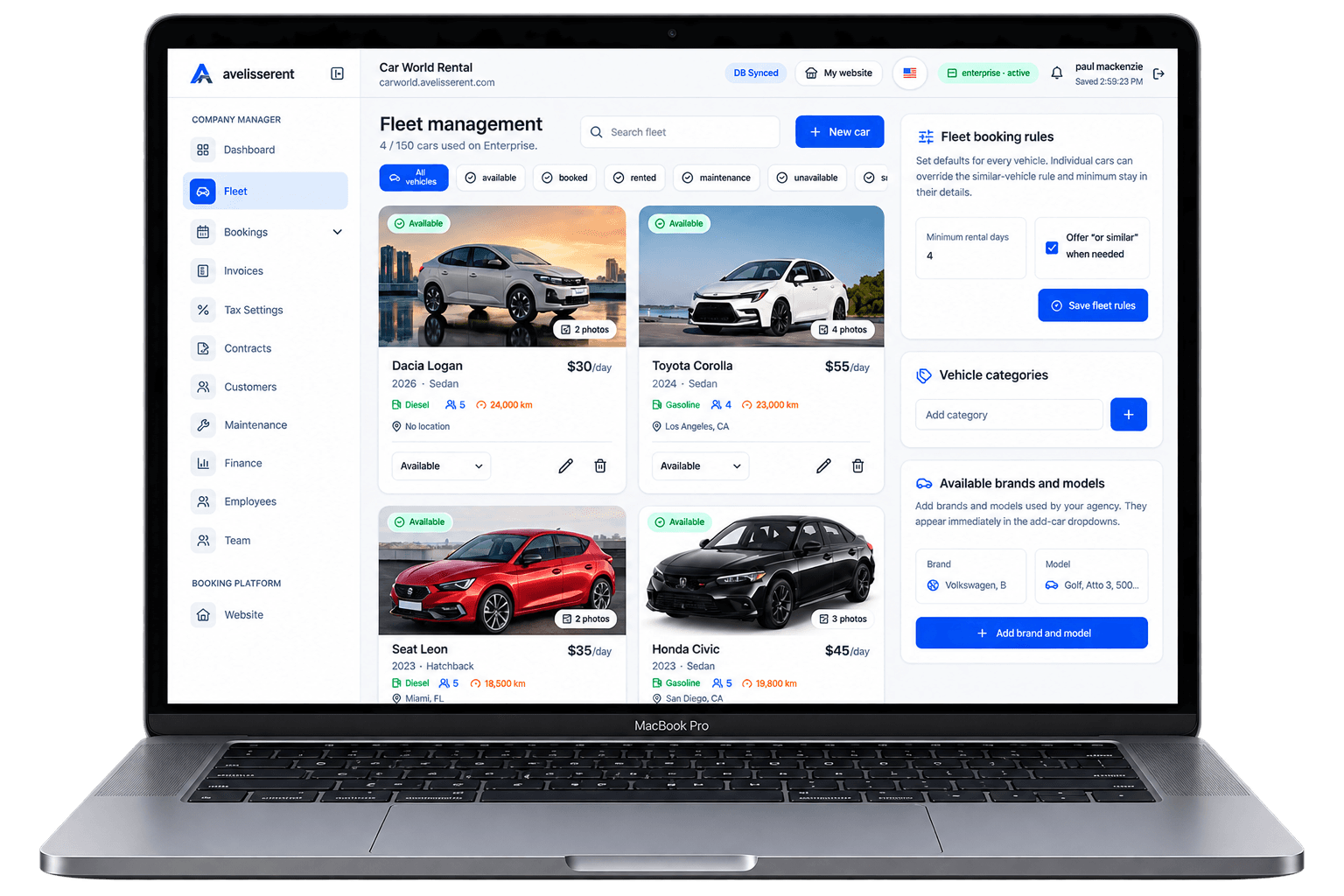
Many people look at busy airport lots and local agencies and think: “I could run a car rental business too.” The idea is appealing, but if you have no experience, turning that idea into a real, operational business can feel overwhelming.
This guide walks through how to start a car rental business from scratch, even if you have never worked in rental before. It focuses on the parts new founders usually struggle with: planning demand, choosing the right fleet model, setting up pricing and policies, and building day‑to‑day workflows that actually work.
Step 1: Define Your Rental Model and Target Customer
Opening a generic “car rental for everyone” is a quick way to create confusion and thin margins. Before you buy or lease a single vehicle, decide who you want to serve and what type of rentals you will focus on.
Common starting models include:
- Local leisure rentals – weekend trips, family visits, holidays.
- Business rentals – local companies needing vehicles for staff or short projects.
- Replacement rentals – customers whose cars are in repair or involved in accidents (often linked with repair shops or insurers).
- Long‑term rentals – 1–12 month rentals for individuals or small businesses.
With no prior experience, it’s usually easier to start narrow, then expand.
Simple positioning framework
Use this 3‑part sentence to clarify your idea:
- Who do you serve?
- What type of rentals do you offer?
- Where do you operate?
Example positioning (customize for your market): “We rent small and mid‑size cars to local residents and tourists for weekends and short trips in [City/Region].”
Why this matters operationally
Your target customer and rental type will directly affect:
- The mix of vehicles you need (compact, SUVs, vans).
- Where you locate your pickup/return point.
- How you price (daily vs monthly rates).
- What policies you set (mileage limits, deposits, insurance rules).
Step 2: Validate Demand Before You Commit
Once your idea is clear, you need to check that there is enough demand to support it. You do not need advanced market research to get started; focus on simple, practical checks.
Practical demand checks
- Map existing competitors
Search for “car rental [your city]” and list local agencies. Note their locations, fleet types, and opening hours. High competition isn’t always bad; it may signal strong demand. - Identify clear gaps
Look for things missing in your area, for example: no automatic cars, no vans, no weekend‑friendly opening hours, poor online booking options, or old fleets. - Talk to local businesses
Short meetings with repair shops, small contractors, or hotels can reveal whether they regularly need vehicles or already refer customers elsewhere. - Test interest online
Create a simple landing page that describes your planned service and allows visitors to request information. A car rental website built with a platform like AvelisseRent can act as this early “interest test” even before your full launch.
Decision checkpoint
After this step, write a one‑page summary:
- Number and type of competitors.
- The gap you plan to fill.
- Rough estimate: how many rentals per month you think you can realistically reach within the first year.
This doesn’t have to be perfect. Its job is to prevent you from buying cars for a market that doesn’t exist.
Step 3: Choose Your Fleet Strategy and First Vehicles
Your fleet is your core asset. For a new operator with no experience, keeping the initial fleet small and simple usually reduces risk. You can always adjust once you see real demand.
Key fleet decisions
- Ownership type – own, finance, lease, or a mix.
- Vehicle categories – economy, compact, SUV, vans, etc.
- Age and mileage – newer vehicles can mean fewer maintenance surprises but higher costs.
- Fuel type – petrol/diesel vs hybrids or EVs, depending on your local infrastructure.
Practical starting approach
Many new agencies start with:
- A small group (for example, 3–10) of similar vehicles to simplify pricing and maintenance.
- One or two larger vehicles (SUV or van) if local demand supports it.
Keeping categories simple makes it easier to manage availability, pricing, and customer expectations with limited experience.
Using fleet software from day one
Even with a small fleet, it is worth organizing your vehicles in professional software instead of spreadsheets. In AvelisseRent, each vehicle has a clear record with status (available, booked, in maintenance), pricing, and photos. You can later make vehicles visible on a public fleet page when you’re ready to start taking online bookings.
Step 4: Set Basic Pricing and Rental Policies
Pricing and policies are where many new owners feel stuck. You don’t need complex formulas at the beginning, but you do need clear, written rules before you accept your first booking.
Build a simple pricing structure
Work through these steps:
- Research local daily rates
Check competitor websites and quote tools to understand typical price ranges for similar cars and rental periods. - Choose a base rate by category
Define a base daily rate for each category (e.g., “Economy: [X], Compact: [Y]”). Later, you can add seasonal adjustments. - Set a mileage approach
Choose between unlimited mileage or a daily limit with an extra per‑km or per‑mile charge. Be explicit in your rental terms. - Decide on deposits and extras
Define a standard deposit ruleset, plus charges for extras such as child seats or additional drivers.
These initial decisions should be written and used consistently. You can refine them as you learn more about your real costs and demand.
Essential policy checklist
Your starter policy set should cover at least:
- Driver age and license requirements.
- Fuel policy (for example, return with the same level).
- Smoking and pet rules.
- Late return rules and how you calculate additional charges.
- Damage reporting process at pickup and return.
- Cancellations and no‑show conditions.
Requirements vary by country and region. It can be helpful to review local regulations or consult a legal adviser to make sure your policies and contracts meet applicable rules where you operate.
How software helps keep policies consistent
One common beginner mistake is changing terms from rental to rental because nothing is written down. AvelisseRent lets you configure pricing, deposits, and conditions for each vehicle category and include them consistently in your rental contracts and booking confirmations, so your team doesn’t rely on memory alone.
Step 5: Design Your Booking and Handover Workflow
With vehicles, pricing, and policies defined, think through how a rental will actually happen from the customer’s point of view, step by step.
Customer journey basics
For a small new agency, a simple journey might be:
- Customer finds you through search, maps, or referrals.
- Customer checks availability and price for dates and vehicle type.
- Customer submits booking request with personal and driver details.
- You confirm the booking, request deposit or payment details, and send a contract.
- Customer arrives for pickup, you verify identity, inspect the vehicle together, and sign the contract.
- Customer returns the vehicle, you inspect again, close the contract, and issue the final invoice.
Practical workflow checklist for each booking
- Before pickup
- Verify availability and block the vehicle for those dates.
- Confirm total price and deposit with the customer.
- Create and share a rental contract including terms and conditions.
- At pickup
- Verify driver license and identity.
- Walk around the vehicle and record existing damage.
- Note fuel level and mileage.
- Confirm deposit handling in line with your payment provider’s rules.
- At return
- Repeat the inspection and compare with pickup records.
- Adjust final charges for mileage, fuel, and any agreed extras.
- Issue an invoice and close the booking in your system.
Building this in AvelisseRent
With AvelisseRent, you can:
- Create a customer‑facing booking flow using a branded website (see the Carworld booking website as an example).
- Display your vehicles on a professional public fleet page, showing categories, photos, and availability.
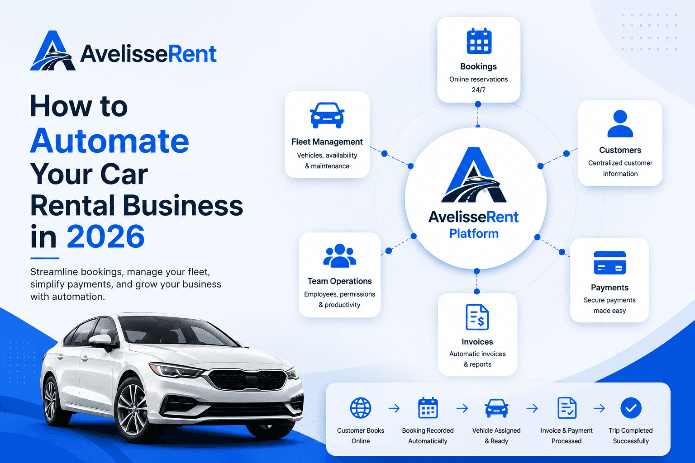
- Receive reservation requests, record customer details, generate contracts, and keep vehicle availability up to date in one place.
This gives new founders a clear structure to follow from the first booking, instead of trying to manage everything in email and spreadsheets.
Step 6: Handle Payments, Deposits, and Basic Admin
New operators often underestimate how much time goes into handling payments and paperwork. Setting up a simple, repeatable system early will save you mistakes and disputes later.
Payments and deposits
Decide and document:
- Which payment methods you accept (card, bank transfer, other options supported by your payment provider).
- When you charge or pre‑authorize the deposit (for example, at booking or at pickup), in line with your provider’s rules.
- When and how you release the deposit after the vehicle is returned, again in line with provider rules and your contract.
Be transparent with customers about how and when charges occur. This reduces misunderstandings and potential disputes.
Invoices, contracts, and records
At minimum, you should have a consistent method for:
- Creating a rental contract for each booking.
- Issuing invoices that show charges clearly.
- Keeping customer and vehicle records organized for future rentals and accounting.
AvelisseRent allows you to manage customer records, bookings, contracts, and invoices in a single system. When connected to Stripe for online payments, you can also accept card payments directly from your booking website, which can help new businesses look more professional from day one.
Step 7: Launch Small, Then Optimize
Once your basic structure is ready, it is time to accept real bookings. Starting with a limited number of vehicles and channels gives you space to learn and adjust.
Simple launch plan
- Soft launch
Open to a small group first (friends, referrals, local businesses you spoke with). This lets you test your workflow and spot issues with contracts, inspections, or payments. - Gather feedback
Ask every early customer what confused them or slowed them down: website wording, pickup instructions, deposit handling, etc. - Adjust your processes
Update your policies, checklists, and website content based on this feedback before you increase marketing and fleet size. - Track the basics
Even with a small fleet, track number of bookings per month, utilization for each vehicle (days rented versus available), and total revenue. This helps you decide when to add more cars or adjust pricing.
Putting It All Together
Starting a car rental business with no experience is entirely possible if you treat it like a series of structured steps rather than a single big leap. The core sequence is:
- Define a clear target customer and rental model.
- Validate there is real demand in your area.
- Choose a simple initial fleet and keep categories limited.
- Set transparent pricing and written policies.
- Design a booking and handover workflow before you open.
- Organize payments, contracts, and records from day one.
- Launch small, learn quickly, and adjust as you go.
A modern platform like AvelisseRent supports many of these steps with ready‑made tools: a branded website, fleet pages, booking management, customer records, contracts, invoices, and online payments with Stripe. This structure is especially helpful when you do not yet have rental experience to fall back on.
Frequently Asked Questions
How many cars do I need to start a car rental business?
There is no universal number, but many new agencies begin with a small fleet they can realistically keep booked and maintained. Starting with a handful of vehicles in one or two categories lets you learn how demand behaves in your area before you commit to a larger fleet. As you track utilization and bookings, you can add more vehicles in the categories that perform best.
Do I need a physical office to start?
Some rental businesses operate from a visible storefront, while others start with a parking location and an online presence. Whether you need a formal office may depend on local regulations, zoning, insurance conditions, and how you want customers to pick up vehicles. A branded booking website that clearly shows your fleet and pickup instructions can reduce the pressure to invest in an expensive storefront at the very beginning.
How should I choose my first vehicles?
Base your choice on your target customer and local roads. If most of your expected customers are local residents and visitors, smaller and mid‑size cars may be a good starting point. If you are close to industrial areas or construction activity, vans or small trucks might make more sense. Keeping your first vehicles similar in type and age reduces complexity for pricing and maintenance.
How can I manage bookings without hiring a large team?
Clear processes and the right tools matter more than headcount at the beginning. A system like AvelisseRent centralizes bookings, vehicle availability, customer details, contracts, and invoices, so one person can manage the full rental journey without switching between multiple tools or spreadsheets.
When should I invest in car rental software?
It can be tempting to wait until you “grow bigger,” but many operational problems — double bookings, missing contracts, unclear damage records — appear even with a small fleet. Setting up software like AvelisseRent early helps you avoid bad habits, establish professional workflows, and present a more trustworthy image to early customers.
How do online payments fit into a new rental business?
Accepting card payments online can make it easier for customers to confirm bookings and can reduce no‑shows. With AvelisseRent, you can connect Stripe to your booking website so customers can pay securely through a familiar payment provider. You should still check how payment timing, deposits, and refunds are handled with your provider and align that with your rental terms.
Related AvelisseRent Guides
- Car Rental Fleet Management: Complete Guide for Agency Owners
- Car Rental Reservation Software: What to Look For in 2026
- Car Rental Booking Software: Complete Guide for Rental Companies
- How to Grow a Car Rental Business: 15 Practical Strategies That Actually Scale
Related Articles
- Car Rental Fleet Management: Complete Guide for Agency Owners
- How to Grow a Car Rental Business: 15 Practical Strategies That Actually Scale
- Designing a Frictionless Online Booking Workflow for Your Car Rental Agency
Manage Your Rental Business With AvelisseRent
If you are starting a car rental business with no prior industry experience, the right structure can remove much of the guesswork. AvelisseRent gives you a branded booking website, organized fleet and customer records, contracts, invoices, and Stripe‑powered online payments in one place, so you can focus on serving customers instead of juggling tools.
Explore how AvelisseRent can support your launch and early growth — try it free or review our plans on the pricing page.

Mohamed Elazzabi
Founder & CEO of Avelisse Labs LLC | SaaS & App Developer | Content Creator
I'm Mohamed Elazzabi, Founder and CEO of Avelisse Labs LLC Launching AvelisseRent SaaS platform built to help car rental businesses simplify and automate their daily operations. I create content about car rental business growth, digital transformation, automation, SaaS, and technology, sharing practical ideas to help rental agencies work smarter, reduce manual tasks, improve customer experience, and grow their business. Building smarter tools for modern car rental businesses.