Browse Booking Management
Booking Management controls the reservation lifecycle after a customer request, phone call, walk-in rental, or agency partner booking enters AvelisseRent. It connects customer details, vehicle assignment, dates, payment status, invoice records, contract links, pickup, return, and the booking timeline.
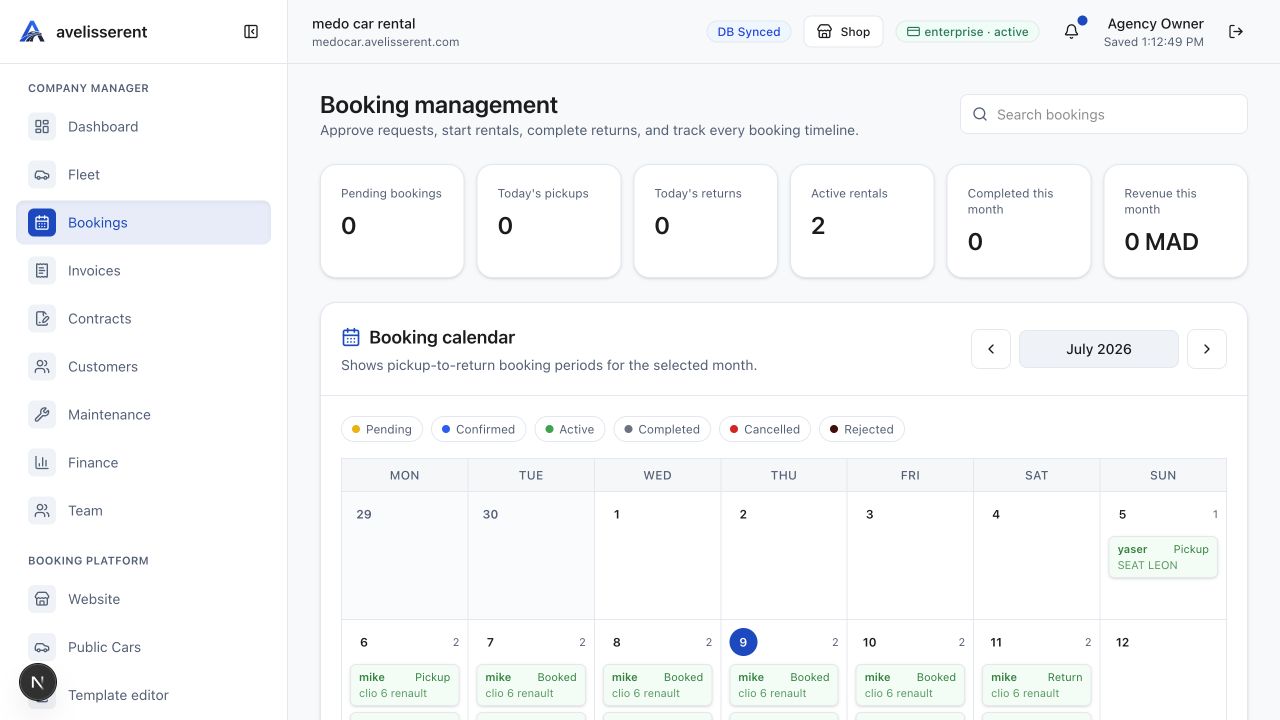
Booking areas in the dashboard
- New booking: create an offline booking for a phone call, walk-in customer, or agency partner.
- Upcoming pickups: review confirmed bookings due for pickup by date filter.
- Active bookings: monitor rentals that have started and are waiting for return.
- Returns: review active bookings due to return by date filter.
- Booking detail: inspect customer information, vehicle, dates, price, invoice, contract, notes, and timeline.
Lifecycle summary
AvelisseRent supports booking states for payment pending, pending, confirmed, active, completed, cancelled, rejected, and no-show. The normal operational path is pending, confirmed, active, then completed.
Related workflows
Bookings rely on accurate Fleet Management, customer records, payment settings, invoices, contracts, and website setup. Confirm the vehicle, pickup details, payment policy, and customer contact details before starting the rental.
Was this article helpful?
Your feedback helps improve official AvelisseRent documentation.